Every paint shop owner knows the sinking feeling. A customer returns a can of paint. They represent a loyal contractor or a DIY enthusiast with a big project. The complaint? The color doesn’t match the sample, or worse, it doesn’t match the can they bought yesterday.
“Mistints” are the silent killers of profit in the coating and ink industry. They waste expensive colorant, ruin base materials, and damage your reputation. While human error causes some problems, the equipment often carries the blame.
Your automatic paint dispenser is the heart of your operation. Like a musical instrument, it requires tuning. This process is called calibration.
In this guide, we will walk you through the professional steps to calibrate your automatic tinting machine. We will explore why accuracy drifts, how to perform the calibration, and how high-quality equipment—like the Sightec DF-M Series—makes this process easier with advanced engineering.
Before we open the machine, we must understand the “Why.” Why do machines lose accuracy?
An automatic paint dispenser is a complex system of pumps, valves, hoses, and software. Over time, several factors affect how much colorant actually lands in the can:
Viscosity Changes: Temperature fluctuations change the thickness of your colorants. A cold winter morning might make the fluid thicker than a hot summer afternoon.
Mechanical Wear: Seals and pumps endure thousands of cycles. Slight wear changes the internal pressure.
Sedimentation: Pigments settle at the bottom of canisters if not stirred properly, changing the density of the fluid being pumped.
Vibration: For gravimetric (weight-based) systems, vibrations from nearby mixers or forklifts can confuse the scale.
If your machine thinks it is dispensing 10ml of Red Oxide, but it actually dispenses 10.5ml, your beige will turn pink. Calibration aligns the software’s expectation with the hardware’s reality.
To calibrate correctly, you must know your machine type.
These machines measure by volume (milliliters or fluid ounces). They rely on the precise movement of a piston or gear pump. Calibration here usually involves dispensing a set amount into a graduated cylinder and telling the software the result.
This is where the industry is heading for high precision. These machines, like the Sightec DF-M, measure by weight. They sit on a high-precision scale.
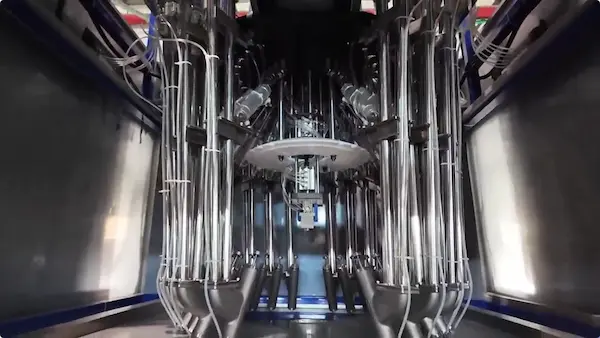
The DF-M Dispenser is a prime example of gravimetric precision. It features a built-in scale with a capacity of <35kg
For the purpose of this guide, we will focus on gravimetric calibration and general pump accuracy, as this represents the best practice for modern coating production.
Do not rush into the software settings yet. Physical preparation is 90% of the success.
Ensure your machine is on a stable, level surface. If you are using a machine with a sensitive scale like the DF-M, external vibrations will ruin your calibration. Stop any heavy shakers or mixers running nearby.
Look at the dispensing head. Is there dried paint? A partially clogged nozzle causes “shooting” or splashing, which affects accuracy.
Pro Tip: Advanced machines like the Sightec DF-M feature an Anti-splash Design
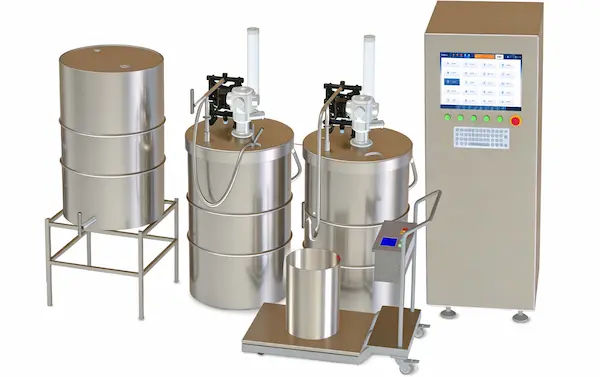
Ensure your canisters are at least 50% full. Low levels can cause air bubbles (cavitation) in the lines. The DF-M series offers flexible tank options ranging from 20L to 200L
Most modern dispensing software, including the comprehensive system used by Sightec
If the machine sat idle overnight, the colorant in the nozzle might be slightly dry or separated. Run a “Purge” or “Dispense” command for each circuit.
Dispense a small amount into a waste cup.
Watch the flow. It should be smooth and continuous, not sputtering. The DF-M uses a Two-stage Multi Flow Valve
Place an empty cup or can on the dispensing table.
In the software, hit “Tare” or “Zero.”
The reading must return to exactly 0.00g.
You will now ask the machine to dispense a specific target amount.
Select a Circuit: Start with one colorant (e.g., Black).
Input Target: Enter a specific weight, for example, 50 grams.
Dispense: Let the machine run.
Gravimetric Machines: The machine will weigh the container automatically after dispensing. It compares the Actual Weight to the Target Weight.
Volumetric Machines: You must take the cup, weigh it on an external high-precision scale, and type that number into the software.
This is where the magic happens.
If you asked for 50g but got 52g, the machine is dispensing too fast or the pump stroke is too long.
Enter the “52g” value into the calibration field.
The software calculates a new “Pulse Factor” or “Step Count.” It effectively tells the motor: “Slow down a little next time.”
Repeat this process for every single circuit (up to 24 circuits on the DF-M model
Calibration gets tricky when you deal with very small amounts or thin liquids.
Many older machines struggle to dispense tiny amounts of colorant for sample pots. They might drip or shoot too much. This is why hardware specifications matter. The Sightec DF-M boasts a Minimum Dispensing Volume of < 1g
Perform a dedicated “Small Shot Calibration.”
Ask the machine to dispense 1g or 2g.
Use a high-precision jeweler’s scale if your built-in scale isn’t sensitive enough for 0.01g variances.
Calibration is specific to the liquid’s thickness. You cannot calibrate with water and expect it to work for thick paste.
The DF-M is rated for product viscosity <6000CPS
If you change your colorant brand to a thicker one, you must recalibrate. The pump will move the thicker liquid slower, leading to under-dispensing if the settings aren’t updated.
Calibration is not just about the pump; it is about the data.
Modern tinting requires your dispenser to talk to other systems. The Sightec DF-M software is compatible with mainstream color measurement software and ERP systems
When you calibrate:
1.Update the Database: Ensure the new calibration data is saved in your local database.
2.Specific Gravity (Density): Check the density settings in your formula management software
3.Backup: Always back up your configuration files after a successful calibration.
Sometimes, the numbers just won’t line up. Here are common culprits:
Symptom: You calibrate, test it, and it’s perfect. You test again, and it’s off by 5 grams.
Cause: Usually air in the lines or a failing valve.
Solution: Purge the line aggressively to remove air bubbles. If the problem persists, check the valve. The DF-M’s Two-stage Multi Flow Valve
Symptom: The machine is accurate in the morning but inaccurate in the afternoon.
Cause: Temperature changes affecting viscosity.
Solution: Climate control in your tinting room is essential. Alternatively, increase the frequency of self-checks.
Symptom: The scale reading fluctuates wildly.
Cause: Electrical interference or physical obstruction.
Solution: Ensure the Compact Footprint
Calibration is not a “fix it and forget it” task. It is part of a maintenance lifecycle. To keep your calibration valid for longer, follow a maintenance schedule.
While the DF-M is designed for easy maintenance
Daily: Visual check of nozzles.
Weekly: Run a nozzle check pattern.
Monthly: Verify the weight of a standard dispense (e.g., dispense 100g of water or solvent) to check the scale’s health.
The DF-M is built for durability with pump sizes of 0.5″ or 1″
Your customers don’t care about pumps, valves, or viscosity. They care about the color on their wall. When they open that can, they trust you.
Calibration is how you honor that trust. It bridges the gap between the digital perfection of a color formula and the physical reality of liquid paint.
If you find yourself constantly battling with calibration drift, clogged nozzles, or software errors, it might be time to upgrade your equipment. You need a machine that combines industrial robustness with laboratory precision.
Are you ready to stop guessing and start dispensing with absolute confidence?
The Sightec DF-M Series offers the perfect balance of compact design, intelligent software, and gravimetric precision. With features like cleaning-free valves
Contact Sightec today to learn how the DF-M can revolutionize your color matching process.
Visit us:
Email: info@sightec.net
Call: +86 181 3719 7160
Don’t let inaccurate equipment drain your profits. Upgrade to precision. Upgrade to Sightec.